Working with the Kafka Consumer and Producer Steps in Kettle
 Comments(0)
 The other day a partner asked how to work with the Kafka Marketplace plugins for Kettle contributed by Ruckus Wireless. I decided to kick the tires and get the steps up and running.
I first started off downloading Kafka, you can find it here:
I downloaded version 0.9 of Kafka. I happened to have a Cloudera Quickstart VM running (CDH 5.4), so I figured I’d run through the quick start of Kafka from that VM. I had no trouble starting up Kafka and sending and receiving basic messages via the console consumer and producer. Getting started with Kafka is very simple! Now on to Kettle.
Within Spoon (Version 6.0), I installed the Kafka Marketplace Plugins. After restarting, I created a very simple transformation. I placed an “Apache Kafka Consumer” step on the palette followed by a “Write to Log” step, can’t get much simpler than that!
In the Kafka Consumer dialog, I specified the topic name as “test” to match what I did during the Kafka Quick Start. I then set the “zookeeper.connect” property to my Zookeeper’s location running on my Cloudera VM, “192.168.56.102:2181″. Finally I specified the group.id as “kettle-group”.
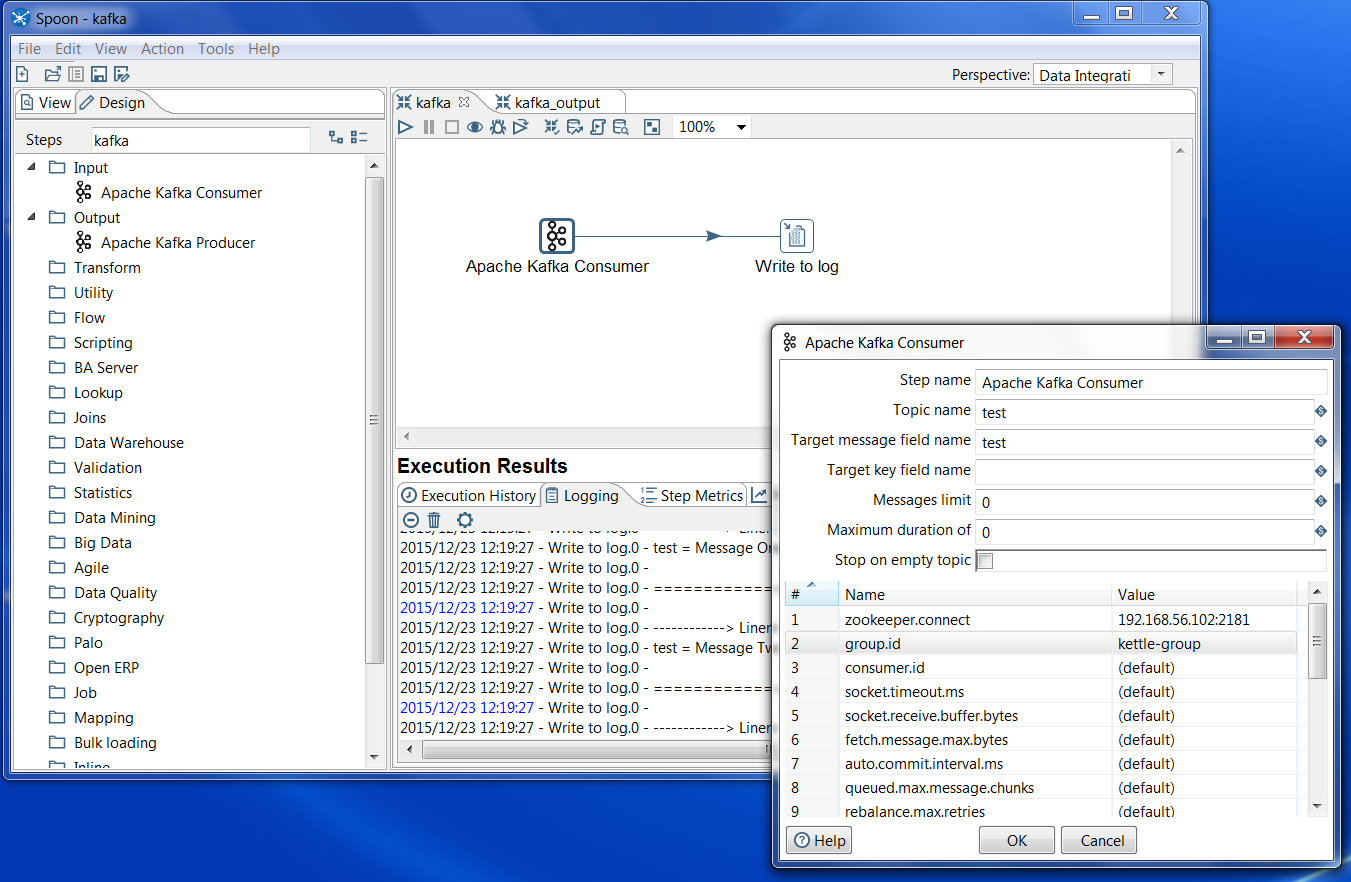
Now that I had things wired up, I figured it was time to run! I had some basic thoughts at this point. Which message does the consumer group start reading from in the Kafka Topic? How long does the step run for before exiting? We’ll get to those answers in a few minutes. First let’s run it and see what happens…
BOOM!
2015/12/23 11:58:18 - Apache Kafka Consumer.0 - ERROR (version 6.0.0.0-353, build 1 from 2015-10-07 13.27.43 by buildguy) : Error initializing step [Apache Kafka Consumer]
2015/12/23 11:58:18 - Apache Kafka Consumer.0 - ERROR (version 6.0.0.0-353, build 1 from 2015-10-07 13.27.43 by buildguy) : java.lang.NoClassDefFoundError: kafka/consumer/ConsumerConfig
Fun with Java Classes. I’m not exactly sure why Kettle can’t find the Kafka class here. I quickly resolved this by placing all the plugin lib jar files in Spoon’s main classpath:
cp plugins/pentaho-kafka-consumer/lib/* lib
Note that this was a hammer of a solution. I renamed all the jar files to start with “kafka”, that way I could quickly undo my change if necessary. Also, I’ve created the following issue over on github, maybe there’s a better approach to fixing this one that I haven’t thought of yet.
https://github.com/RuckusWirelessIL/pentaho-kafka-consumer/issues/11
Once I restarted Spoon, I re-ran the transformation and … got no results from Kafka. I tried a bunch of different configurations, I sent additional messages to Kafka, but no luck. So I did what any developer would do, and checked out the latest source code.
git clone https://github.com/RuckusWirelessIL/pentaho-kafka-consumer.git
From there I ran “mvn package”, and got a fresh new build. I replaced plugins/steps/pentaho-kafka-consumer with the new target/pentaho-kafka-consumer-TRUNK-SNAPSHOT.zip. After running it and seeing a similar NoClassDefFoundError, I repeated my steps with the new plugin jars, moving them to the main classpath.
Another thing I ran into was on the Kafka configuration side. Kafka was using the hostname of my VM for comms, which my OS wasn’t aware of. I fixed this by updating config/server.properties advertised.host.name to the public IP address of the VM.
After restarting Spoon, I successfully read in the messages from Kafka! Note that at this time you can’t reset the message offset for a specified group, so the only way to re-read messages is to change the “group.id”. This is a feature that Ruckus is considering adding, it would be a great way to contribute to the open source plugin!
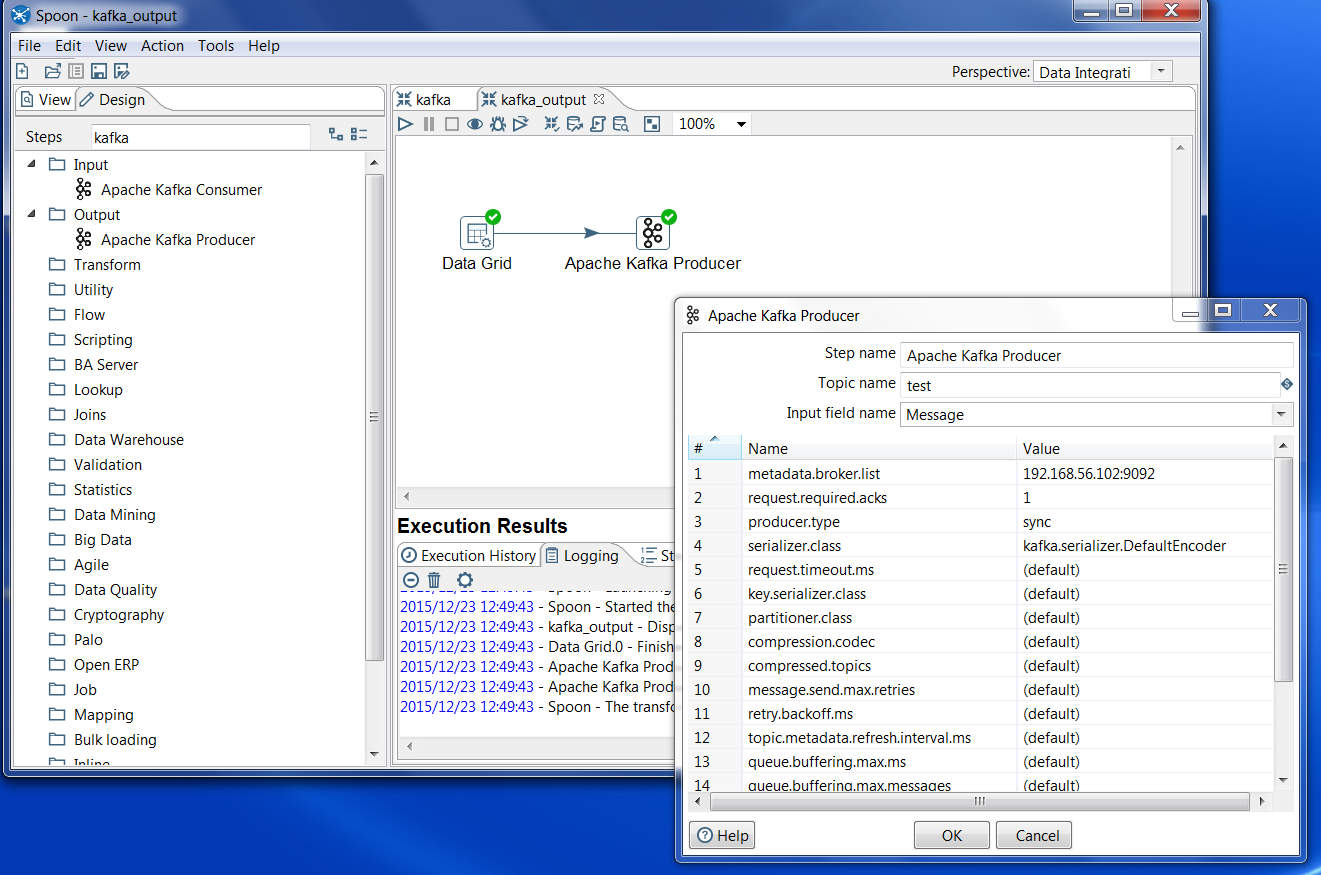
After getting the Consumer working, I went ahead and tried out the Producer. Note that the Producer step needs Binary data to feed a topic. All I had to do was feed in Binary data, specify the topic name (I used “test” again), and finally specify the “metadata.broker.list” with the correct IP and port, and it worked like a charm! Note that at this time I didn’t have to rebuild the producer plugin like I did the consumer, but without the consumer jars being placed in the lib folder the producer wouldn’t function either.
So how might you use Kettle and Kafka together? Kafka is becoming the de-facto big data message queue, and can be used in combination with Spark and other Hadoop technologies for data ingestion and streaming. Kettle can be used as a way to populate a Kafka Topic via the Apache Kafka Producer, or it could be used to consume messages from a topic via the Apache Kafka Consumer for downstream processing. Ruckus Wireless, the company that contributed the steps, uses Pentaho Data Integration to ingest data into Vertica and then visualize the data with Pentaho Business Analytics. You can learn more about Ruckus Wireless use case here:
http://www.pentaho.com/customers/ruckus-wireless
Here are links to the github locations for the plugins:
https://github.com/RuckusWirelessIL/pentaho-kafka-consumer/
https://github.com/RuckusWirelessIL/pentaho-kafka-producer/